




Sand & Gravel Permit guidance
The Sand & Gravel General Permit limits stormwater pollution and requires permittees to:
- Create a site management plan.
- Create a monitoring plan.
- Conduct sampling.
- Report to us.
We provide guidance to help you meet the requirements in your Sand & Gravel General Permit (SGGP).
This guidance shows you how to:
- Submit Discharge Monitoring Reports
- Submit DMRs for inactive sites
- Report oil sheens
- Reporting no discharge
This guidance is not a substitute for reading and understanding your permit requirements.
Submitting Discharge Monitoring Reports (DMRs)
- Find general guidance at WQPermitPortal/DMR user guide.
Discharge Monitoring Reports (DMRs) for the Sand & Gravel General Permit (SGGP) are due quarterly on Jan., April, July, and Oct. 30.
Some inactive sites still require DMRs
- Most inactive sites do not need to submit DMRs.
- Inactive sites with discharge of process water and/or mine dewatering water must submit DMRs (S4.C.1 and S10.A.1.b).
- If you add or withdraw raw materials or finished products from stockpiles during the quarter and discharge stormwater to surface waters of the state, you must submit DMRs (S4.C.2 and S10.A.1.b).
Inactive site status change
To change your facility status for active to inactive or vise versa, fill out and send in an Operating Status Change Form.
Reporting oil sheens
When are you required to monitor?
The permit requires monitoring for oil sheen daily when:
- Operating equipment
- Runoff occurs
You may need to monitor every day of the month during the rainy season.
Logging the incident on your DMR
The online DMR form doesn’t have a monthly “No oil sheen” button. Do not enter no oil sheen for each day.
Instead, you can quickly:
Adding a note
If no oil sheen was observed every day of the month when equipment was operating and runoff occurred, include a comment at the monitoring point level.
State in the note:
- You monitored throughout the month
- Which months
- You observed no oil sheen
For example, in the DMR:
- First, write in the last day of the month for all three months in the quarter (first red box in the picture below).
- Second, write in the Oil and Grease column next to the Yes/No entry, you would click on the box to add a note.
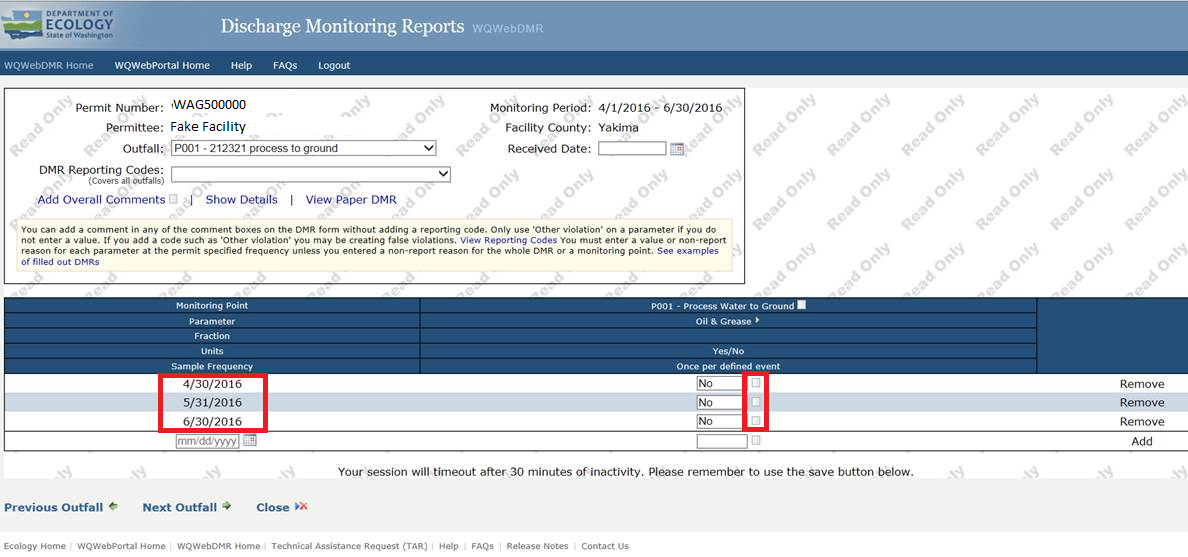
- Add in your observation of no sheen for the entire month.
- Leave the reporting code blank.
- Do not add a no discharge reporting code.

Excel import
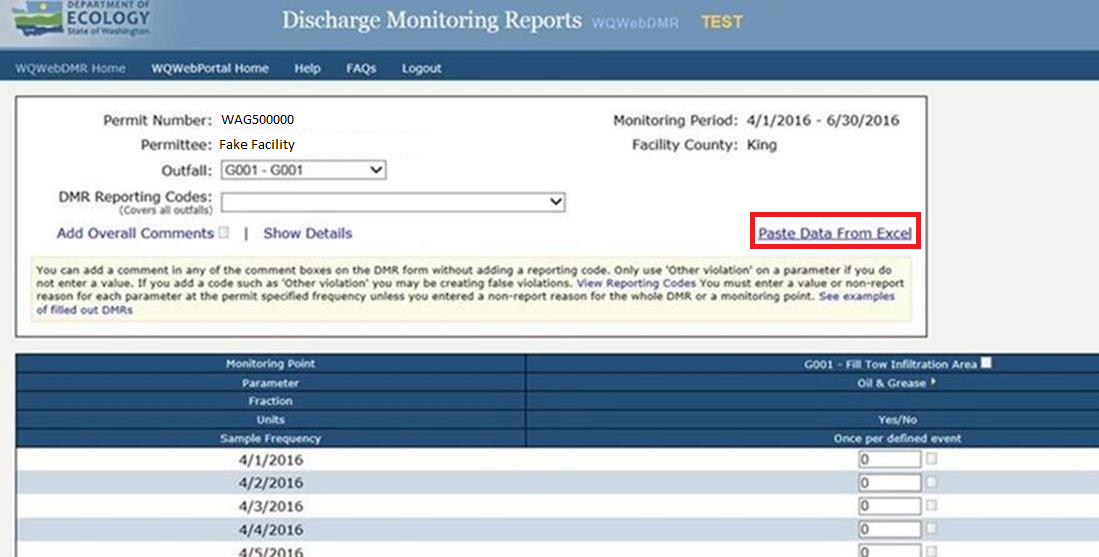
- Find the "Paste data from Excel" option.
- From your Excel spreadsheet insert your date and a value of "0" for no oil and grease observed.
- Fill down the dates and “0” values.
Reporting "No discharge"
- "No discharge" means there was no discharge to sample during the whole reporting period.
- The online DMR form doesn’t have a monthly "No discharge" button.
- Your monitoring plan should include alternative sampling times based on typical rainfall patterns.
- Take advantage of storm events when they happen.
Groundwater "No discharge" reporting
1. If you must monitor quarterly, and you had no discharge for the three months in the quarter, or if you must monitor monthly and had no discharge for the three months in the quarter:
- Choose "No discharge" from the DMR reporting codes drop down.

2. If you must monitor monthly, and your active facility discharged one or two months, but not all three:
- Create one entry per month that you did not discharge.
- Put in monitoring values for the month that you did discharge.
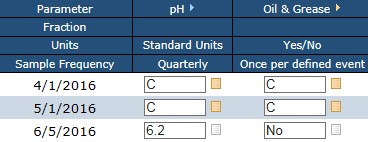
For example, if your facility discharged only in June (not in April or May), you would create entries for 4/1 and 5/1 and mark all the values for both entries as “C” (No Discharge). You would put in your monitored values for the entry in June.
Surface water discharge
If you have a surface water discharge, you must have at least two monthly entries including turbidity.
1. If your facility does not discharge at all for the entire quarter, enter "No discharge" for your DMR.
2. If you have more than one monitoring point and some of them discharged and some did not, mark "No Discharge" for each Monitoring Point that did not discharge.

3. If your active facility discharged one or two months, but not all three:
- Create two entries per month of no discharge.
For example, if your facility discharged only in June (not in April or May), you would create entries for 4/1, 4/15, 5/1, and 5/15, and mark all the values for all four entries as “C” (No Discharge). You would put in your monitored values for the entries in June.
Related links
Quick guidance links:
Contact information
Eric Daiber
Sand & Gravel General Permit Writer
eric.daiber@ecy.wa.gov
360-742-1511